

Day Trading Setup: The Exact Equipment and Software I Use After 25 Years
Updated September 2026
It started with a Compaq laptop in a Michigan State dorm room in 1999.
The dorm had ethernet. The second that cable plugged in and I had a live data feed, I was hooked. I was 18 years old staring at charts on a machine that probably cost my parents $1,200, and I thought I had everything I needed to trade.
I was wrong about the trading part. But I was right about the setup part — you do not need much to get started.
I have been trading full-time since the end of 2007. I founded Bulls on Wall Street in 2008 and have trained over 7,000 students through the 60-Day Live Trading Bootcamp. In that time I have watched more traders blow money on equipment than I can count. Six-monitor rigs, custom-built gaming machines, $500 mechanical keyboards. Then they sit down on Monday morning, open their charts, and have no idea what they are doing.
The setup does not create the edge. Let me show you what actually matters — and what I personally use every day.
What I Learned Trading Through Internet Outages
Before we talk hardware, let me tell you what it was actually like to trade in the early days.
Internet outages were just part of life from when I started in 1999 all the way through the mid-2010s. Your connection would go down once every couple of weeks. It would randomly slow down during parts of the day. You were constantly unplugging your router, waving it around in the air, praying for something to happen. That was just the job.
When your internet died mid-trade back then, you were done. If you had a Blackberry — and I was on a Blackberry before I finally adopted the iPhone around the iPhone 3 — you could pull up your brokerage on a black-and-white screen with no charts, just numbers and dashes, and at least get out of your positions. That was survival mode.
And if that did not work? You drove to the nearest library or coffee shop. I cannot count how many times I ended up at the local bar at 2 PM finishing out the trading day because that was the only place with reliable WiFi within driving distance.
My point: traders who started in 2020 with 5G and fiber internet have no idea how good they have it. Your setup today is better than what professionals were working with fifteen years ago. Stop obsessing over it and start trading.
What I Actually Run Today
Let me break down my exact setup because I get asked this constantly.
Desktop: Digital Tigers
At home I use a desktop I bought from digitaltigers.com. I have been buying computers from them for years — the last two machines each lasted five or six years without major issues. Great customer service, lifetime ability to call in and get troubleshooting. As somebody who does not want to spend time fixing computers, that matters more to me than saving $200 by sourcing individual components from random warehouses in China or Singapore and building it myself. Could I build the same machine for less? Yes. Is it worth my time? No.
Specs on my current desktop: AMD Ryzen processor, 64GB of RAM, two-terabyte SSD as the primary drive. Then I keep a one-terabyte SSD as a backup, and another one-terabyte SSD as a backup to the backup — specifically for files like pictures and videos that would slow down the main drive. My trading drive stays clean. That is not overthinking it, that is protecting your most important tool.
One thing I want to be clear about: we are running charts, not rendering 4K video. A 5-minute candle updates once every five minutes. The computing load is nothing compared to gaming or video editing. You do not need a $4,000 machine. You need a machine that does not freeze on you at 9:31 AM when you are trying to get into a position.
Laptop: Dell XPS 17
When I am traveling I use a Dell XPS 17 with 64GB of RAM, one-terabyte SSD, and an Intel i9 processor. It is a workhorse. I have taken that thing to 20 countries.
Honest review: I would not buy it again. It is nine pounds. That is heavy. Not exactly the machine you want to lug through airports or carry around Provence — which I did this past summer, and I was not thrilled about the weight. It is a desktop replacement, not a travel laptop. It does the job but it has the elegance of a cinder block.
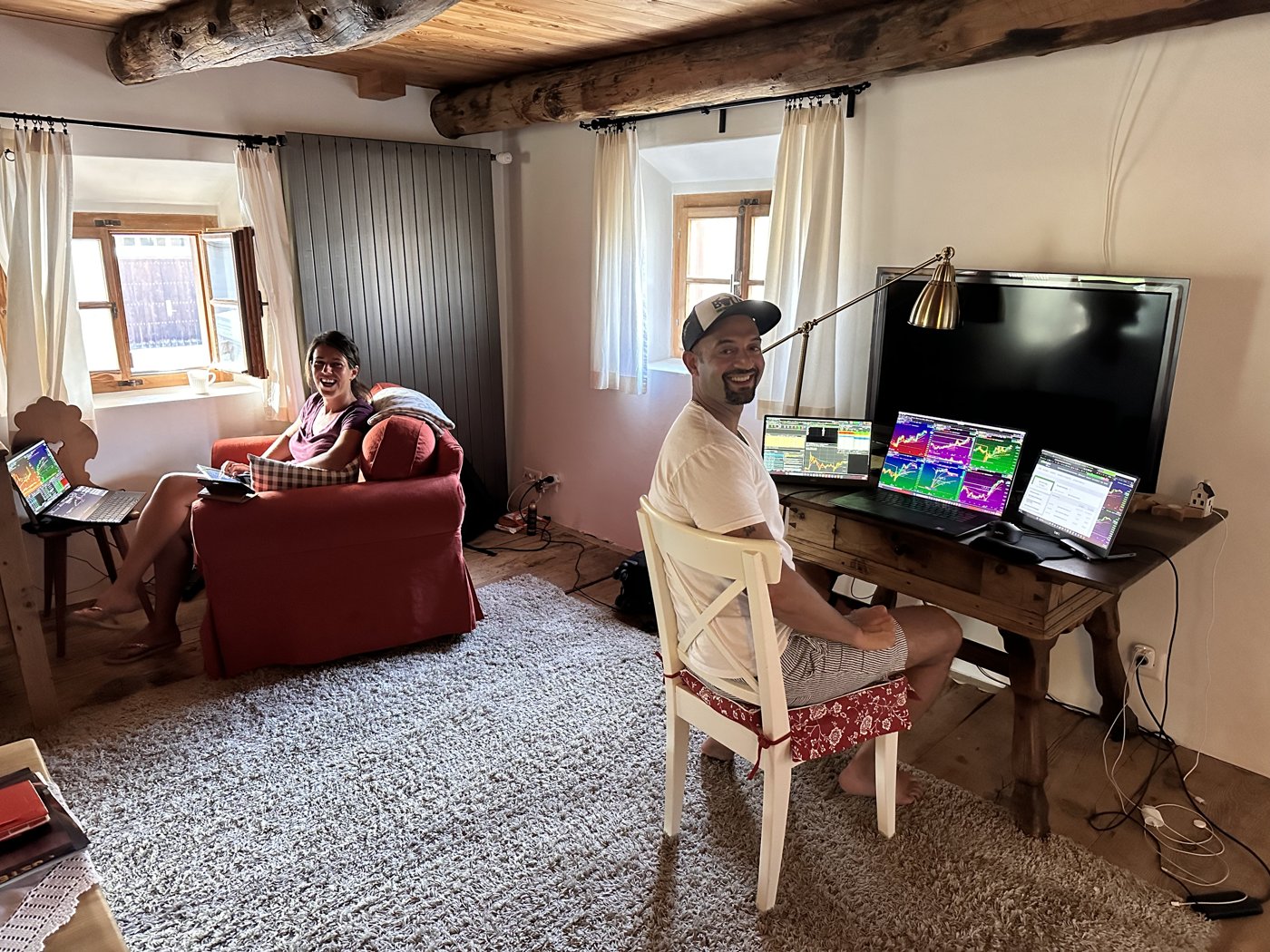
I pair it on the road with two Dell 14-inch portable monitors. USB-C connection, powered directly by the laptop, no separate power brick needed. They pair cleanly with a Dell laptop, but the real reason I use them is they take a beating. Matte screens, not glossy, and a solid base so they stand on a hotel desk without a separate stand. No case needed. Mine are about five years old and still going.
Road layout: two TC2000 layouts across the portable monitors, broker on the laptop screen. I execute on DAS Trader when I travel because it is the lightest order-entry platform I have used. It barely touches the CPU and it stays up on a shaky connection. Thinkorswim is a resource hog. In a hotel you are on wifi, not wired, and you do not know how fast or how stable it is. Trade on the lightest platform you can when your internet is the weak link.
That is my full travel trading setup. Compact, functional, gets the work done. Some of my best trading has actually happened on that setup.
MacBook Air: The Backup and Business Machine
I keep a MacBook Air as well, and this is where it gets interesting.
For day-to-day business work — social media, video editing, Instagram, responding to messages — Mac is just easier. It pairs with your iPhone seamlessly, you can read and send texts from your laptop, it is lighter, it is faster for general use. Frankly it is just more fun to use.
But here is the problem: DAS Trader only runs on Windows. TC2000 technically runs on Mac but it is noticeably laggier — there is a small something in the mouse movement, a slight delay, it is just not made for the platform. When you are trading and every tick matters, that lag matters.
So the MacBook Air serves as my backup if the Dell goes down, and my primary machine for everything that is not trading. The moment I need to actually trade, I am on Windows.
And speaking of Windows — anyone who has used Windows knows what I am talking about when I say the Blue Screen of Death is a real relationship you have with that operating system. You are going to get it once a week, especially when you least expect it. You are going to spend an afternoon on support with some guy who claims he lives in North Carolina while he tells you your computer is not broken when you can literally show him on the screen that it is broken. That never happens with a Mac.
But when I was in Provence this summer and had an issue with my iPhone, I walked around the corner and there was a little Apple Store tucked into the town. Apple Care, no questions asked, they fixed it. You are never getting that with Dell or any Windows manufacturer. So I keep both.
Monitors
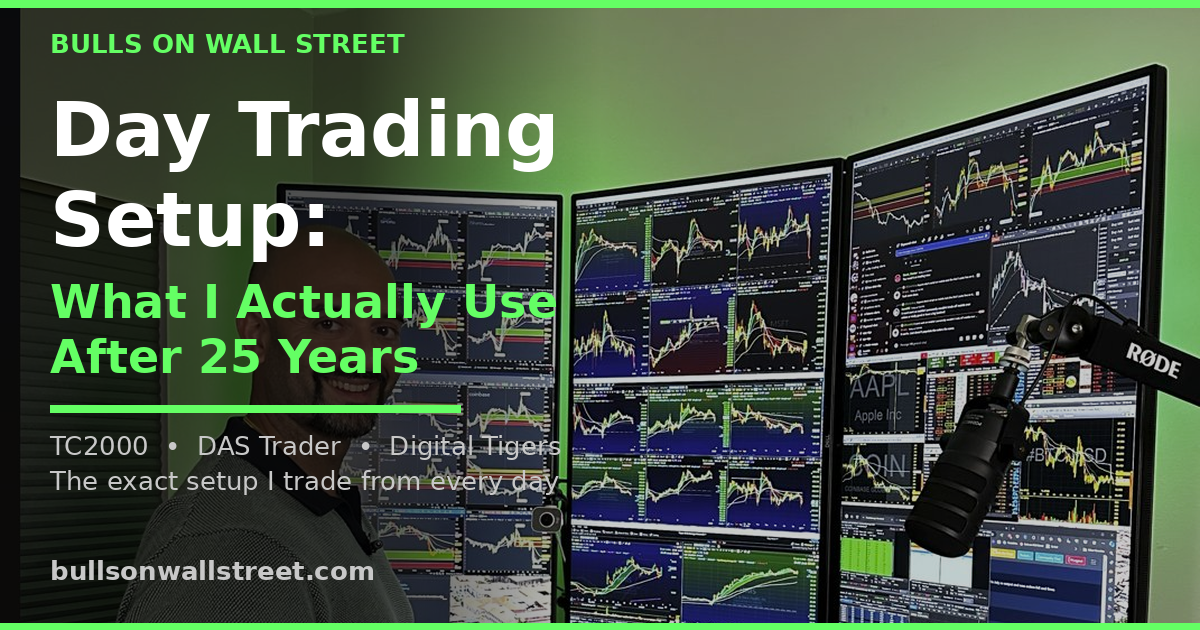
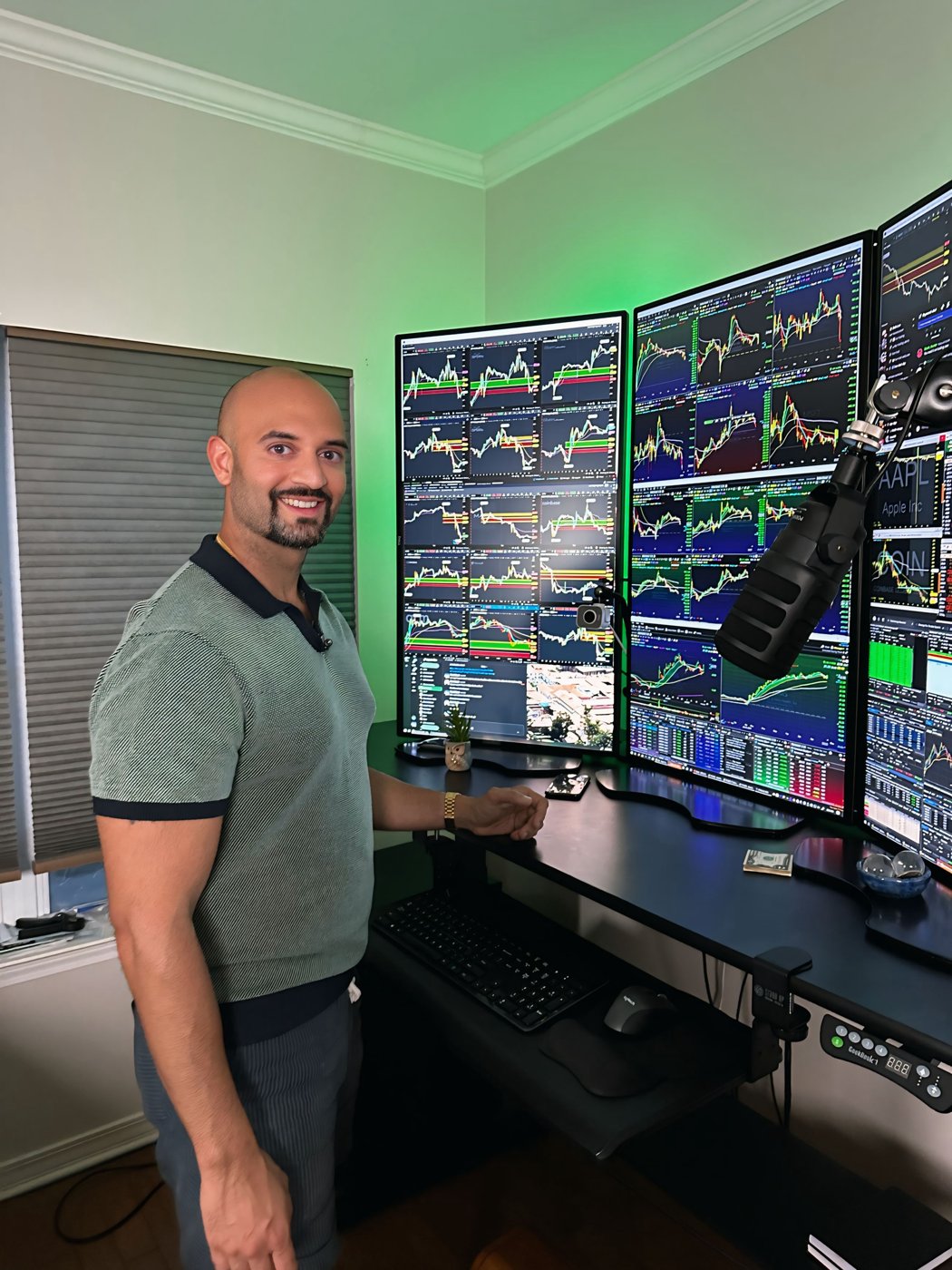
At home I run three Dell 43-inch 4K monitors. That is not because three monitors made me profitable. I was profitable long before I had those monitors. It is because of how I run my TC2000 layout specifically.
My setup: 40 market indexes sorted by five-day performance on the left screen, go-to watchlist on the second screen, primary chart windows on the third screen. That layout is built around TC2000's sector breadth functionality. The three screens serve that workflow. They are not decoration.
If you are starting out, two monitors is all you need. One for charts, one for your broker. Get profitable on that. Add screens when you can articulate exactly what the extra screen space buys you in terms of workflow, not because some trading influencer's setup photo looked impressive.
Monitor size: 24 to 27 inches is the practical range when you are starting. I moved to 43-inch 4K panels because one screen holds an entire TC2000 layout without scrolling, but that is a workflow decision years in, not a starting point. Avoid curved monitors — charting platforms look visually off on them, particularly the horizontal price levels and moving averages that you are reading constantly.
The Software Stack — This Is What Actually Matters
Hardware is the boring part. Software is where real decisions get made.
TC2000: Non-Negotiable
I have used TC2000 for over 20 years. It is my charting and scanning platform. Every pattern I look at — first pullbacks, opening range setups, VWAP plays — gets analyzed in TC2000 first.
Why TC2000 over everything else? Scan speed. When I am running my pre-market gapper scan or pulling up 40 market indexes sorted by five-day performance, that data loads immediately. ThinkorSwim and TradeStation are solid platforms but they are slower on scanning, particularly in the pre-market window when you are identifying your plays for the day.
The layout I described — 40 indexes on the left, go-to watchlist, four chart windows — is built entirely inside TC2000. The sector breadth functionality, the T2108 indicator that tracks the percentage of stocks above their 40-day moving average, the alert system that texts me when a stock hits my pre-set level — all of it lives in TC2000.
If you are not using a dedicated charting platform and you are trying to trade off your broker's built-in charts, you are working with one hand tied behind your back. Get TC2000. Use it every morning. The scan speed alone is worth it.
DAS Trader: Order Entry
TC2000 is for analysis. DAS Trader is for execution. Hotkey order entry, direct market access, fast routing. Windows only — no Mac version. If you are day trading with any size, you need a direct-access platform. Clicking through a broker's web interface to enter positions is not how this works at any professional level.
Broker: E*Trade Pro and Guardian Trading
E*Trade Pro and Guardian Trading are my primary brokers, and they are what I trade through when I travel. I have held an Interactive Brokers account for years, but it is not something I use day to day. For traders starting out, Schwab or Fidelity are fine: zero commission, reliable platforms, solid customer service. As your account size grows and execution quality starts to matter more, look at Interactive Brokers or a direct-access broker. If you want a prop firm that gives access to buying power, The TradeMakers is where a lot of our students are trading now.
Trade Journal: Tradezella
Non-negotiable. If you are not journaling your trades you are flying blind. Tradezella automatically imports your trade history and gives you real analytics — win rate by setup, average win vs average loss, best time of day, worst time of day. Your memory is biased toward memorable trades. The journal gives you the actual data.
I have been journaling since before journaling tools existed. I was doing it manually in spreadsheets. The reason I know exactly what my edge is and where I leak — early exits, holding losers too long, taking setups outside my best time window — is because I have years of data on myself. Build that data starting now.
News Feed: Benzinga Pro
Real-time news matters for day trading. If a stock I am watching prints a news item at 9:35 AM and I am reading it thirty seconds after the market has already moved, I am behind. Benzinga Pro gives me the feed speed I need for momentum trading. It is not the only option, but it is what I use.
The Actual Priority Order
Here is how I would rank the importance of each piece if you are building your setup from scratch:
First: your charting and scanning software. TC2000. This is where you find your plays. Get this right before anything else.
Second: your broker and execution platform. Reliable, zero-commission, direct access when you need it.
Third: your internet connection. Wired ethernet. Have a cellular hotspot as backup. When your connection drops mid-position and you have no backup, you learn fast.
Fourth: your computer. Reliable Windows machine, 32GB RAM minimum, SSD. Does not need to be expensive. Needs to not freeze.
Fifth: monitors. Two to start.
Sixth: everything else. Wired internet, news feed, lighting. They matter but they do not drive outcomes the way the first three do.
Watch how I set up and use TC2000 in real trading sessions on the YouTube channel: youtube.com/@kunaldesaitrading
FAQ: Day Trading Equipment and Software
What computer do I need for day trading?
A Windows desktop or laptop with an AMD Ryzen or Intel i7/i9 processor, at least 32GB of RAM, and a solid-state drive. You are running charts, not rendering video — the computing load is low. The most important spec is reliability. I use Digital Tigers for my desktop builds because of their customer service and longevity, and a Dell XPS 17 as my travel machine.
How many monitors do I need for day trading?
Two is the functional minimum — one for charts, one for your broker. I run three 43-inch 4K panels because of my specific TC2000 workflow. Start with two. Add screens only when you can clearly explain what the extra space buys you operationally.
Mac or PC for day trading?
Windows for trading, Mac for everything else. TC2000 runs on Mac but with noticeable lag. DAS Trader is Windows-only. Keep a Mac for business tasks and as a backup. Keep a Windows machine as your primary trading computer.
What charting software do professional day traders use?
TC2000 is what I have used for over 20 years. ThinkorSwim and TradeStation are common alternatives. What matters: scan speed, watchlist functionality, and data feed stability during high-volume opens. Indicator count is irrelevant.
What internet speed do I need for day trading?
Stability over speed. Use wired ethernet rather than WiFi. Have your phone's hotspot set up as a backup. The day your internet dies mid-position without a backup ready is the day you remember to set it up.
What is the best broker for day trading?
Interactive Brokers for execution quality at larger size. Schwab or Fidelity for traders starting out — zero-commission, reliable, and solid platforms.
Do I need expensive equipment to start day trading?
No. A reliable Windows computer, two monitors, wired internet, TC2000, and a zero-commission broker account is all you need to start. Under $1,500 in hardware, around $100 to $150 per month in software. The biggest variable in your results is not the equipment.
What is DAS Trader?
DAS Trader is a direct-access order entry platform built for active day traders. It runs on Windows only and allows fast order routing, hotkey execution, and direct market access. I use it alongside TC2000 — TC2000 for analysis, DAS Trader for execution.
What is T2108 and why does it matter?
T2108 is a market breadth indicator built into TC2000 that tracks the percentage of stocks trading above their 40-day moving average. I check it every morning before the open. Below 20 means I am sizing down. Below 10 and I start looking for bounce setups. Below 5 is rare capitulation — aggressive buying opportunity in leading stocks.
Do I need a trade journal?
Yes. Non-negotiable. Your memory is biased toward memorable trades, not accurate ones. A journal like Tradezella builds the actual dataset you need to identify where your edge is and where you are leaking. Most traders who stagnate after six months are skipping this step.
What is the PDT rule?
The Pattern Day Trader rule is gone. FINRA eliminated the PDT designation and the $25,000 minimum equity requirement effective June 4, 2026, replacing it with real-time intraday margin standards. Brokers have until October 2027 to finish rolling it out, so check whether yours has switched over. Account size no longer caps how many day trades you can make. It still caps how much risk you can survive.
How much does a professional day trading setup cost?
My full setup — Digital Tigers desktop, Dell XPS laptop, Dell portable monitors, TC2000, DAS Trader, E*Trade Pro, Tradezella, Benzinga Pro — runs roughly $1,500 to $2,000 in hardware upfront and $150 to $200 per month in software. That is the entire professional operation. You do not need more than this.
Swing Traders: You Do Not Need Any of This
Here is something I want to be clear about because I watch students make this mistake constantly.
A lot of people come into BOWS and immediately start obsessing over monitors and computers and high-speed news feeds before they have even figured out what kind of trader they want to be.
If you are a swing trader, you do not need four monitors. You do not need a high-speed news feed. You do not need DAS Trader. Swing trading runs off daily charts. You check your positions in the evening, set your alerts, go to sleep, and manage the trade the next morning. A single laptop with TC2000 is genuinely all you need to run a full swing trading operation.
The equipment list I described above — four monitors, desktop machine, DAS Trader, real-time news — that is a day trading setup built around momentum trading in the first 90 minutes of the session. It is calibrated for speed and real-time scanning.
Figure out your style first. Then buy the equipment that matches it.
Do not rush out and buy a bunch of monitors and a big supercomputer before you know whether you are even going to be a day trader. Get in the game first. Some of my best profits have come while traveling with the simplest possible setup.
I spent the summer in Europe this year. Dell XPS 17, two portable Dell 14-inch monitors that plug straight into the laptop via USB-C. That is it. No separate power brick, no complicated setup. I was more than fine. You can get portable monitors now for under $100. One of those and a $600 laptop and you are in the game.
Get the profits first. Then buy the gear that makes your life easier or saves you time. Not the other way around.
The Setup Is Not the Edge
I started on a Compaq laptop in a dorm room in East Lansing. I became consistently profitable in 2006. I went full-time at the end of 2007. I built BOWS into a company that has trained 7,000 traders. The setup evolved as the business grew. The profitability came first.
The most expensive setup in the room does not win. The most disciplined trader in the room wins. The one who has done the 60-Day Bootcamp work, built real pattern recognition through the first pullback strategy and the opening range setups, who uses their pre-trade checklist every single morning without skipping steps — that person. Not the one with six monitors and a custom keyboard.
Get your setup solid and simple. Then forget about it and go learn to trade.
The 60-Day Live Trading Bootcamp is where you build the real edge — watching me trade live for 60 days with real capital, then building your own system with simulator data backing it up before you ever risk a dollar live.
Over 7,000 students since 2008. The ones who succeed do not have better monitors. They have better discipline.
Apply for the next bootcamp here.
Watch live trade analysis and chart setups: youtube.com/@kunaldesaitrading
Written by Kunal Desai
Kunal Desai is the founder and CEO of Bulls on Wall Street. He has been trading professionally since 1999 and went full-time in 2007. Since founding BOWS in 2008, Kunal has trained over 7,000 students through the 60-Day Live Trading Bootcamp. His work has been featured in Forbes, Fortune, and Inc. He trades momentum stocks daily using TC2000 and shares live trade analysis on the Bulls on Wall Street YouTube channel.